You area boxa coach
Book a callCall

A coach cancels at 6 am? One SOS, and it's off your mind.

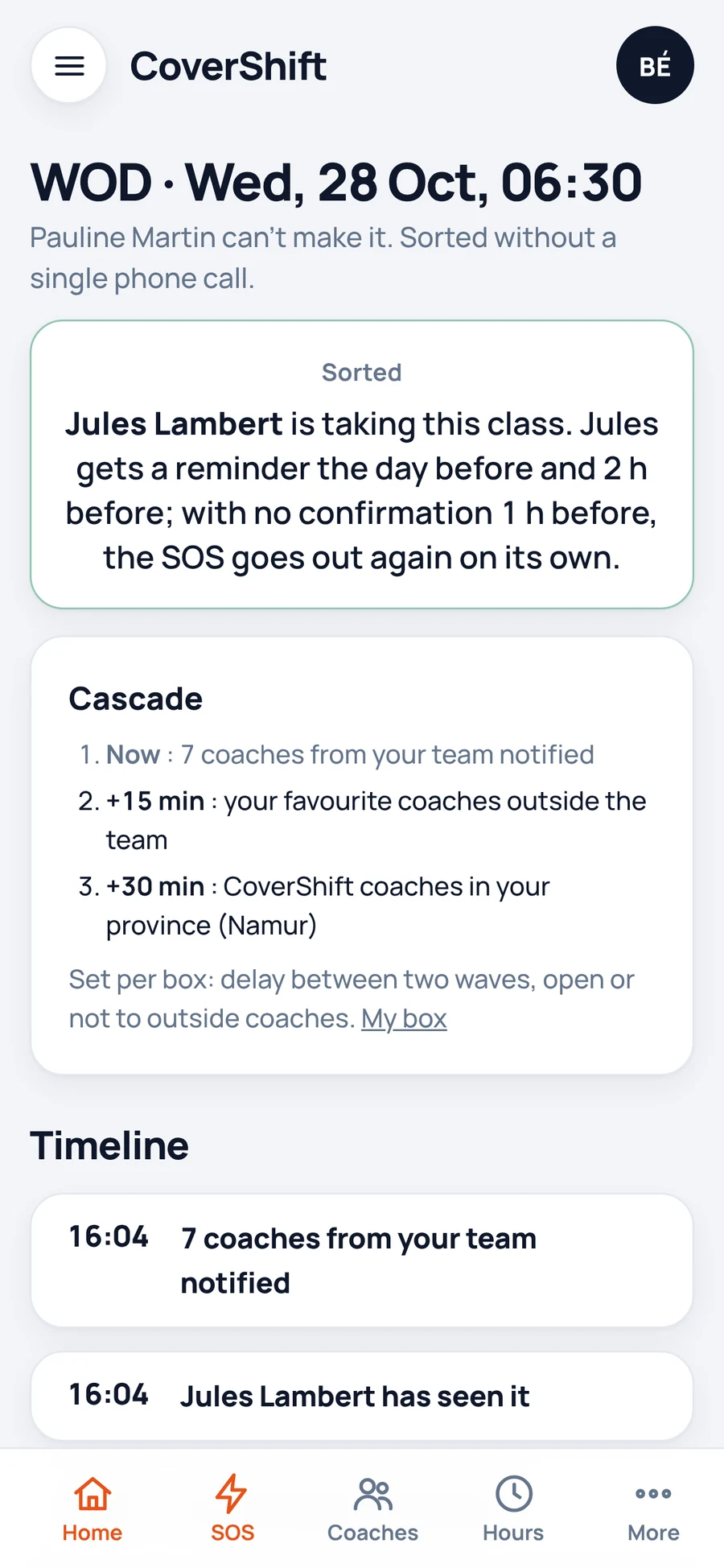
Three fields on your phone, and your whole team is alerted. The first to accept takes the class and gets the address and a reminder. No one answers? The alert moves on to your favourites and goes out again on its own.

The schedule and the month's hours follow on their own, nothing to recount.

Book a callSee the demo

For CrossFit boxes in Belgium. Pricing on request, in a 15-minute call. Always free for your coaches.

Are you a coach? See CoverShift for coaches

Wednesday 6:30 am: Pauline can't make it, Jules takes the class. Demo screenshot, fictional box and coaches.

Missing a coach? One message, and you know who's coming.

  1. You send an SOS

    When, which class, what rate: three fields, from your phone.

  2. The alert goes out in waves

    Your team is notified straight away. Nobody replies? Your favourites, then verified CoverShift coaches in your province, once the network is open there. You can require a minimum certification.

  3. The first to accept comes

    They get the address and your practical info, then a reminder the day before and two hours before. If they haven't confirmed an hour before, you're alerted and the SOS goes out again on its own.

Get a test SOS, right here, right now.

Ten seconds: you allow notifications, a sample SOS lands on this device, you tap “I'll take it”. Exactly what your coaches experience.

Android and computer: right away. iPhone: first “Add to Home Screen” from Share, then open from the icon.

One standard week, and the next eight are ready.

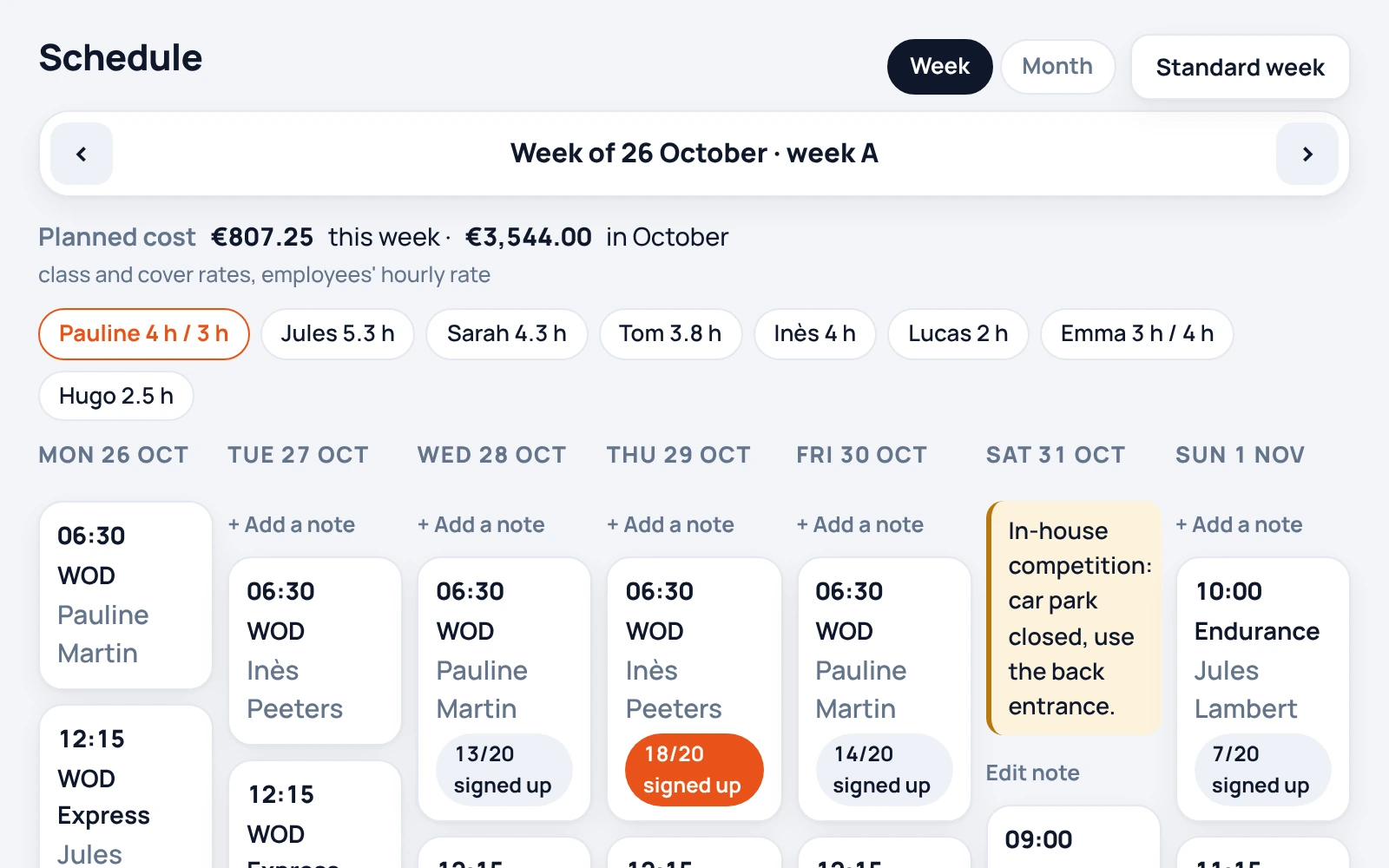
You lay out your week once. CoverShift carries it forward, works out the cost and lets each coach know when you publish.

  • The schedule in an Excel file, sent on WhatsAppA standard week, rolled out over eight weeks, with the planned cost
  • The new timetable announced in ten messagesPrepared as a draft, then one message per coach when you publish
  • Leave requested by text messageRequested in the app, accepted in one click, balances up to date
  • Everything goes through youA head coach manages the schedule, without seeing rates or payroll
A week of the schedule: each class with its coach, the planned cost, a note for Saturday and two classes still without a coach. Fictional box and coaches.

Hours counted, payroll ready.

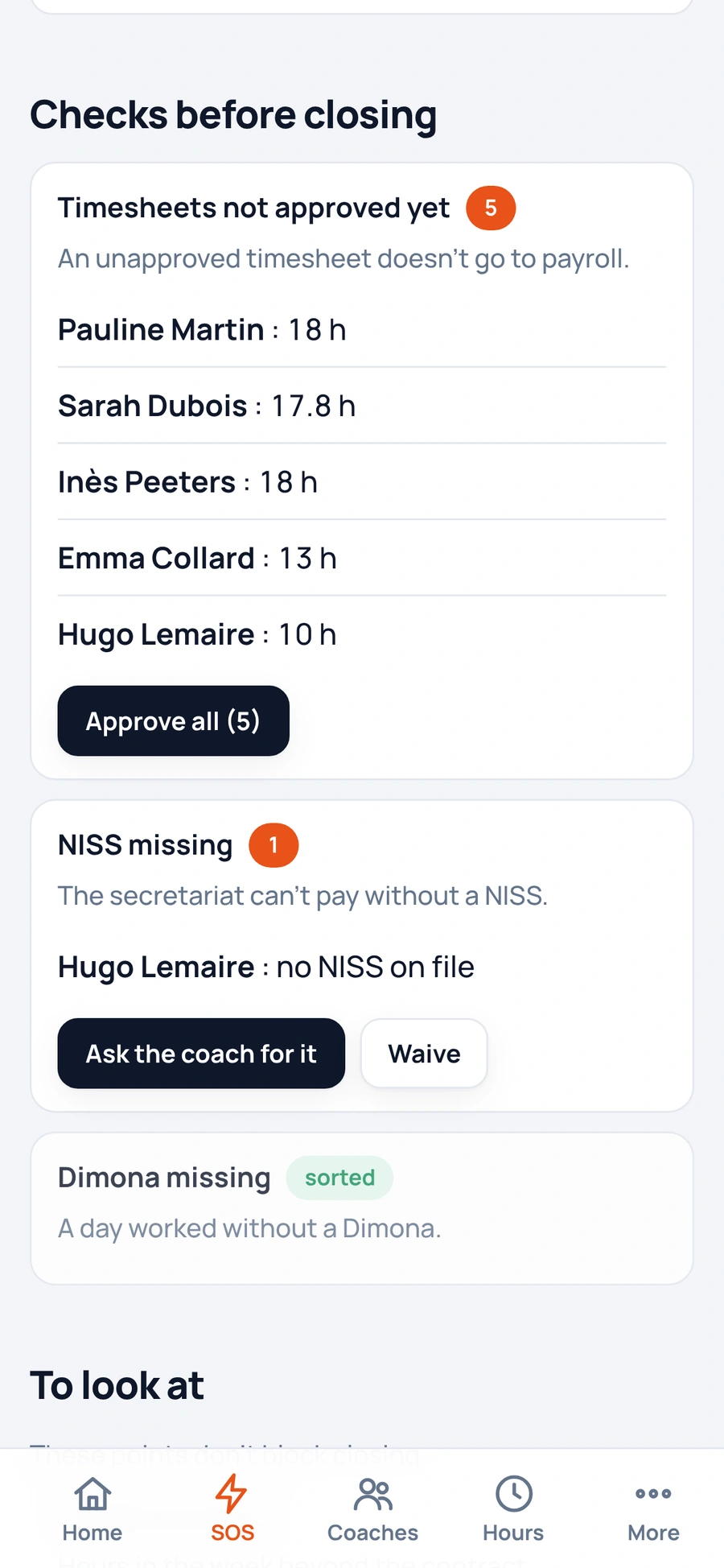
Nothing to recount: everything comes from the schedule and the covers. You check, you approve, and every file is ready.

  • Hours recounted at the end of the monthCounted from the schedule and covers, approved by you
  • The social secretariat file made by handReady when you close the month, after the checks
  • Self-employed coaches paid one by oneAll paid in one go: a SEPA file or a QR code
  • Dimona entered one day at a timePrepared, and corrected when the hours change

The Dimona goes out with your box's NSSO access, which you link once. Until then, everything runs in simulation: nothing is sent.

Monthly payroll on a phone: what still needs sorting before the file is sent. Fictional data.

The basics as well as the others. And everything on top.

Everything below is in the app today. Planning and SOS to your team included; outside coach and payroll pack as options, explained on the call. Compare feature by feature with Shyfter, Skello, Wodify and Clubplanner.

Before it gets stuck

  • At-risk classes. The classes in the next three weeks at risk of having no coach, and why: leave requested, unavailable, exams, class elsewhere, public holiday.
  • Plan B per slot. You decide in advance what happens if nobody takes a class. Two hours before, it applies on its own and the message to members is ready.
  • On-call coach. One week, one reachable coach, one flat fee: every SOS that week reaches them first.
  • Fatigue radar. Seven days in a row, split days, late SOS, overfull weeks, rest too short: flagged in time.
  • Exam periods. Your students note their exam sessions once, you see it before you schedule.

When you assign a class

  • Safeguards. 11-hour rest, a student's or flexi-job's hour cap, a missing document: the app warns you before you confirm.
  • Caps across all boxes. Student, flexi-job, volunteer, article 17: each coach's counter adds up all their boxes.
  • Documents by class type. Criminal record extract for a kids' class, liability insurance for an outside freelancer: attached to the coach's passport, checked before you assign.
  • Notice period. A schedule changed too late? The coach accepts or declines in their app, and the answer is recorded.
  • Deadlines. Contract ending, flexi-job to reconfirm, certification expiring: reminders ahead of time.

With the team

  • Fixed class swap. Two coaches swap a slot for good: the colleague accepts, you approve, the standard week follows.
  • Note for the cover coach. Written or dictated by the regular coach, read by whoever takes the class.
  • Slot memory. Opening, key, equipment: what applies to this class every week, read by whoever teaches it.
  • Slot wishes. Who wants to drop what, who would gladly take over: you know it when a slot opens up.
  • Fair share of unpopular slots. The slots nobody wants, counted per coach against a fair share, with a rotation proposed in one tap.
  • Arrivals and departures. A new coach observes, then coaches in a pair before their first class alone. A coach who leaves hands over their classes one by one and leaves a note for their successors.

To steer the box

  • Working time register. The time worked each day and every later correction, kept.
  • Hours certificate. A coach's hours over the period you choose, ready to hand over.
  • Margin per class. Attendees times the value of one attendance, minus the coach. Attendance entered by hand, or Wodify sign-ups.
  • Member feedback. A QR code shown at the end of the class, the coach who taught it sees the result.
  • Special day. Heatwave, snow, strike: you tick the classes to cancel, each coach gets one message with the reason.
  • Time to cover. Every SOS keeps the time it took to find someone.

Your coaches don't need to download an app.

They get your invitation by WhatsApp or text message, open the link and turn on alerts.

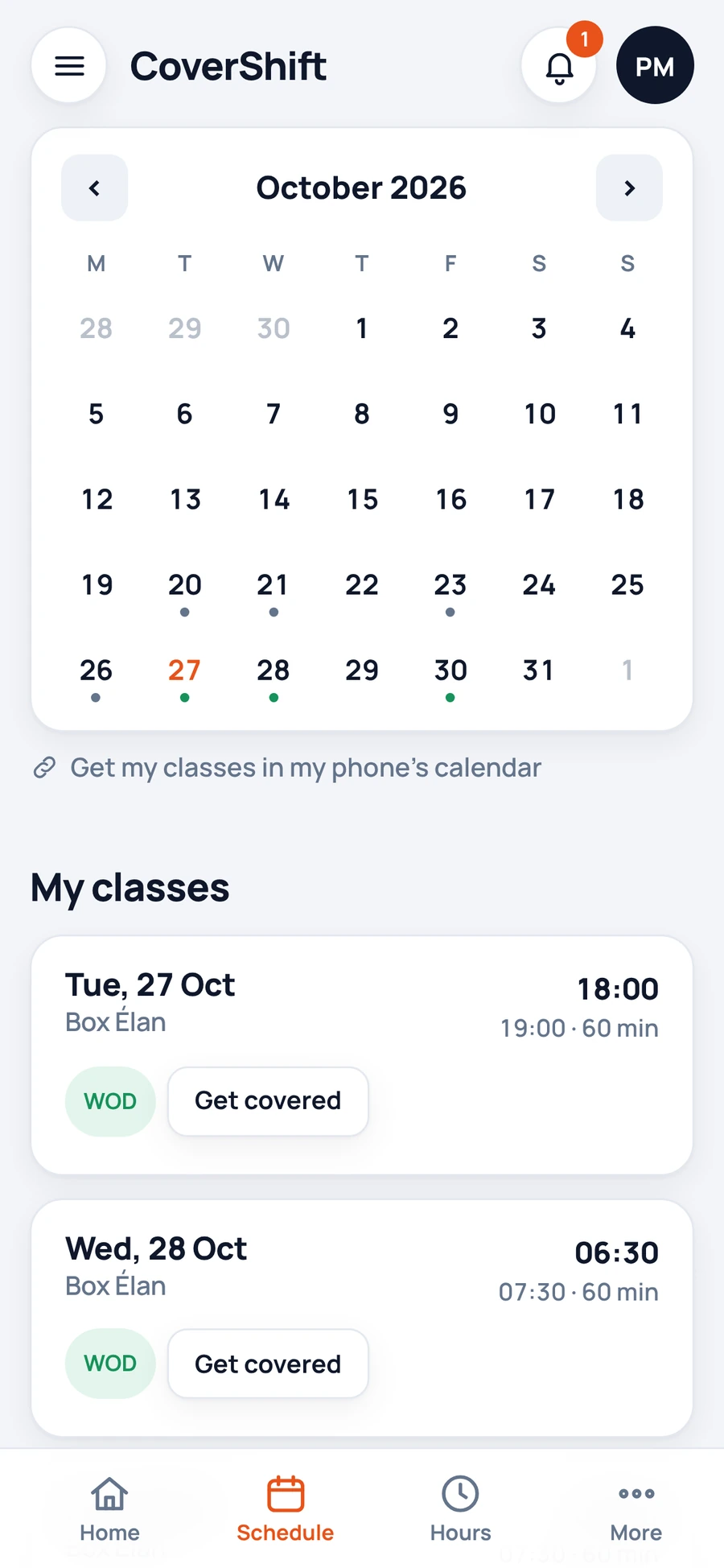
Their classes show up in their phone's calendar, and your notes appear on their schedule.

  • They request leave and see how much they have left.
  • They see their hours for the month and get their approved timesheet.
  • They choose which alerts reach their phone.
  • They give their IBAN and NISS once, and only the boxes they work for can see them.

Free for them, and it stays that way.

Are you a coach? See CoverShift for coaches

Pauline's schedule on her phone: her classes for the month and the link to her phone's calendar. Fictional box and coaches.

Switch tools without retyping a thing.

Book a call

Compare with Shyfter, Skello, Wodify and Clubplanner

Coming from Shyfter? Here's how to switch

On Wodify? Here's what CoverShift adds

  • Shyfter, Excel or CSV. You import the file once, CoverShift recognises the columns and you check them.
  • Wodify. It connects with your API key.
  • Clubplanner, or another tool. An Excel or CSV export of your schedule imports as it is, columns recognised.
  • No risk. Keep your current tool while you compare.

What does your scheduling cost you today?

That time costs you

per month. In a 15-minute call, we look with you at how much of it CoverShift gives back.

Calculated with your own numbers, nothing is saved.

Pricing on request.

A 15-minute call with Matthieu: how your classes run, who handles replacements, how your coaches are paid. You leave with a price that fits your box.

With WNGMN

Built in

WNGMN, the software that runs your box: members, bookings, payments.

CoverShift's sister product: CoverShift is built into it, with the same account.

Discover WNGMN

  • Always free for your coaches.
  • Nothing is billed without your agreement.
  • Your data is yours: a full export of the box in one click, any time.

CoverShift is starting in Wallonia and Brussels.

Book a callSee the demo

Made in Belgium by Matthieu Vanderkelen, CF-L3 coach and former box owner.

What box managers ask us.

I'm on Shyfter, or it's all in Excel. Do I have to start over?

No. You import your Shyfter export, your Excel file or a CSV: CoverShift recognises the columns, you check them, and your standard week is set up.

If your classes are in Wodify, you connect your API key.

Keep your current tool while you compare.

My coaches are employees, students, flexi-jobs or self-employed. Does it work for all of them?

Yes. Hours are counted automatically from the schedule and covers. You approve them at the end of the month and each coach gets their timesheet.

Employees, students and flexi-jobs go into the file for your social secretariat. Self-employed coaches are paid in one go, with a SEPA file to upload to your bank or a QR code.

Volunteers and article 17 coaches have their status too. The hour caps for students, flexi-jobs, volunteers and article 17 are tracked across all their boxes, and the app warns you before a class goes over.

Does CoverShift replace my social secretariat?

No. Your social secretariat calculates salaries and makes the payslips.

CoverShift prepares the month's work for them, checked, in a file ready to send.

Who is responsible for the Dimona?

Your box, as today: it's the employer.

CoverShift prepares each Dimona, sends it with your box's NSSO access and shows you the response. Until that access is linked, everything runs in simulation: you see what would be sent, but nothing is sent.

There are hardly any CoverShift coaches in my province. Is the SOS any use?

Yes. The SOS goes to your team first, then to your favourites, so it works from day one.

Coaches in your province add backup as they sign up, and you decide whether your SOS alerts go outside your box.

Who sees what, and where is the data?

Data is hosted in the European Union, in Frankfurt. A coach's NISS and IBAN are only visible to the boxes they work for.

Your head coach manages the schedule without seeing rates or payroll. Nothing is sold or used for advertising.

What works today?

The SOS, the schedule, leave, hours, pay with the file for your social secretariat, transfers and file imports. And everything described above, from plan B to the working time register: every feature on this page is in the app today.

The Wodify connection is ready and is set up with you on your account.

Dimona runs in simulation until your box's NSSO access is linked.

What if I want to leave?

You export your whole box in one click from “My gym”: schedule, coaches, hours, payments, register, as files that open anywhere. Your data is yours, there is nothing to ask for.

I use WNGMN.

CoverShift is built into WNGMN, with the same account. It also works without WNGMN. Either way, the price is set in a 15-minute call.
Rather see your own classes?

Send the link to your timetable to contact@covershift.be, and your demo is ready the next day.

Book a callSee the demo