You area boxa coach
Create my coach accountSign up

Extra classes, close to home.

Boxes that use CoverShift post their cover classes. You see the day, the time, the box and the rate, and you decide.

The first to tap “Take” teaches the class.

Create my coach accountI'm a box

For CrossFit coaches in Belgium. Free, and it stays that way. Nothing to install.

CoverShift · nowSOS · Box ÉlanWed 29 Oct 06:30 · WOD · €40
06:30Wed 29 Oct
WODSOSMy boxBox Élan · 60 min
40 €Take
09:00Sat 1 Nov
Endurance★ FavouriteBox Atlas · Namur · 45 min
35 €Take
Example, fictional boxes

One alert, one button, one more class.

  1. The alert comes in

    On your phone: when, where, which class and what rate.

    The boxes where you coach alert you first, then the ones that added you as a favourite, then, once your profile is verified, the other boxes in your province.

  2. You take it

    One tap on “Take”. If you're first, the class is yours and the box is notified.

  3. You coach it

    You get the box's address and practical info, then a reminder the day before and two hours before.

You choose what rings: every box in your province, or only your own boxes and your favourites.

How much more could you earn?

Extra every month

that's a year.

Each box sets its own rate, and you see it before you accept.

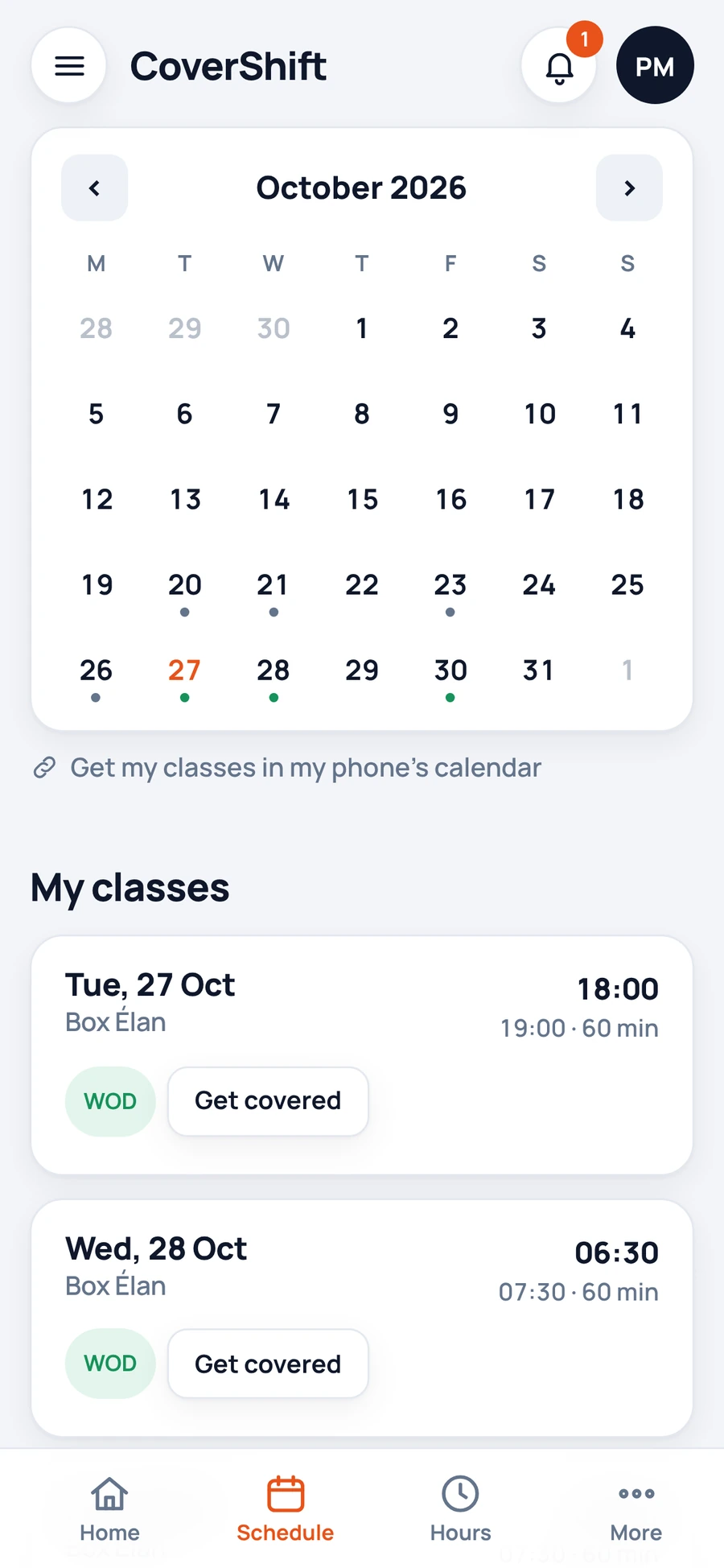
Your whole schedule, on your phone.

Your box invites you by WhatsApp or text. Open the link, turn on alerts, and you're set.

  • The schedule sent as a screenshotYour classes in your phone's calendar, updated automatically
  • Changes buried in the WhatsApp groupA message for you when your schedule changes
  • Leave requested by text messageRequested in the app, with what you have left
  • Can't make it, and ten messages to send“Get covered” on your class, and the SOS goes out on its own
Pauline's schedule on her phone: her classes for the month and the link to her phone's calendar. Fictional box and coaches.

Your hours counted, your payment ready.

Your hours come from the schedule and the cover classes. The box approves, you get your statement.

  • Your hours recounted by handCounted from your classes, visible any time
  • Self-employed: an invoice to write every monthThe self-billing invoice prepared in your name, if you agree
  • Transfers made one by oneAll self-employed coaches paid in one go, by SEPA transfer or QR code
  • Employee, student, flexi-job or SMart: different paperwork for eachYour hours go to the right place, based on your status
  • Your IBAN sent to every new boxEntered once, visible only to the boxes you work for

Tools built for coaches, not just for the box.

Everything is in the app today, and free for you.

  • Estimated net. Before you accept a class, what you will keep net according to your status. An estimate, not a payroll calculation.
  • One counter for all your boxes. Student, flexi-job, volunteer or article 17: your hours add up across all your boxes, with the cap alongside.
  • Exam periods. You note your exam sessions once. Your boxes see it before they schedule, and you choose to keep your classes or free them up.
  • Swap a fixed class. You propose a swap to a colleague, they accept, the box approves, your standard week follows.
  • Slot wishes. Say which classes you would gladly take on, and which you would like to drop.
  • Note and slot memory. Before a cover, you read what you need to know: the regular coach's note, opening, key, equipment.
  • Notice period. A schedule changed too late? You are asked to agree, in one tap, and your answer is kept.
  • My working time. Your hours worked day by day, and your hours certificate whenever you need it.
  • On-call coach. One week on call, one flat fee, and the box's SOS reach you first.
  • Your first steps in a box. Observation, then classes in a pair, before your first class alone.

A profile that works for you.

Create my coach account

  • Your certifications. Added with proof and checked by CoverShift.
  • Your public page. To share with boxes looking for a coach.
  • Your provinces. You get cover classes where you want to coach.
  • Your unavailability. Set once, so you only get asked when you're free.
  • Your boxes. One account for every box where you coach.

Your box doesn't use CoverShift yet?

Talk to your manager: the whole team can be invited from day one.

See the page for boxes

What coaches ask.

Is it really free for me?

Yes, and it stays that way. Boxes pay for CoverShift.

Do I need to install an app?

No. Open the link you received and turn on alerts.

You can also add CoverShift to your phone's home screen, like an app.

I coach at several boxes.

One account is enough: all your boxes and all your classes in one place.

I'm self-employed, a student, on a flexi-job, an employee or with SMart. Does it work?

Yes. Each box records your status, and your hours go to the right place: the file for its social secretariat, a bank transfer or SMart.

I'm a student. Where do my hours stand?

Counted across all your boxes at once, with the year's cap alongside, in your app.

Your exam sessions, noted once, are seen by your boxes before they schedule.

Who sets the rate for a cover class?

The box, in its SOS. You see it before you accept.

There are few CoverShift boxes near me yet.

CoverShift is starting in Wallonia and Brussels.

Create your profile now: you'll get cover classes as soon as a box in your province opens its SOS to CoverShift coaches.

Who sees my data?

Your national register number and IBAN are visible only to the boxes you work for.

Data is hosted in the European Union and never sold.
Ready for your next cover class?

Your account in two minutes. Free for coaches, and it stays that way.

Create my coach accountI'm a box